
Verifying your Google Business Profile is a vital factor to create your business presence on Google Search, and Google Maps. Yet, the verification process does not always mean your firm will be featured straight away. It is common for business owners to feel anxious when they search for their business on Google Maps following verification and they can’t see their business listed.
If you are wondering “Why is my business not showing up on Google Maps after verification?” there are a few reasons for it.
What Happens After Google Business Profile Verification?
Verification of your Google Business Profile shows that you are authorized to manage the listing for the business. Verification could be via video, phone, email, postcard or another way, depending on your business and Google’s criteria.
Verification is performed, but it may take some time for Google to review your profile and update its systems. Your listing may not appear instantly on Google Search and Maps. It takes time to be visible to everyone.
Verification confirms ownership or management of the profile but doesn’t guaranty a spot at the top of every local search.
Why Is My Business Not Showing Up on Google Maps?
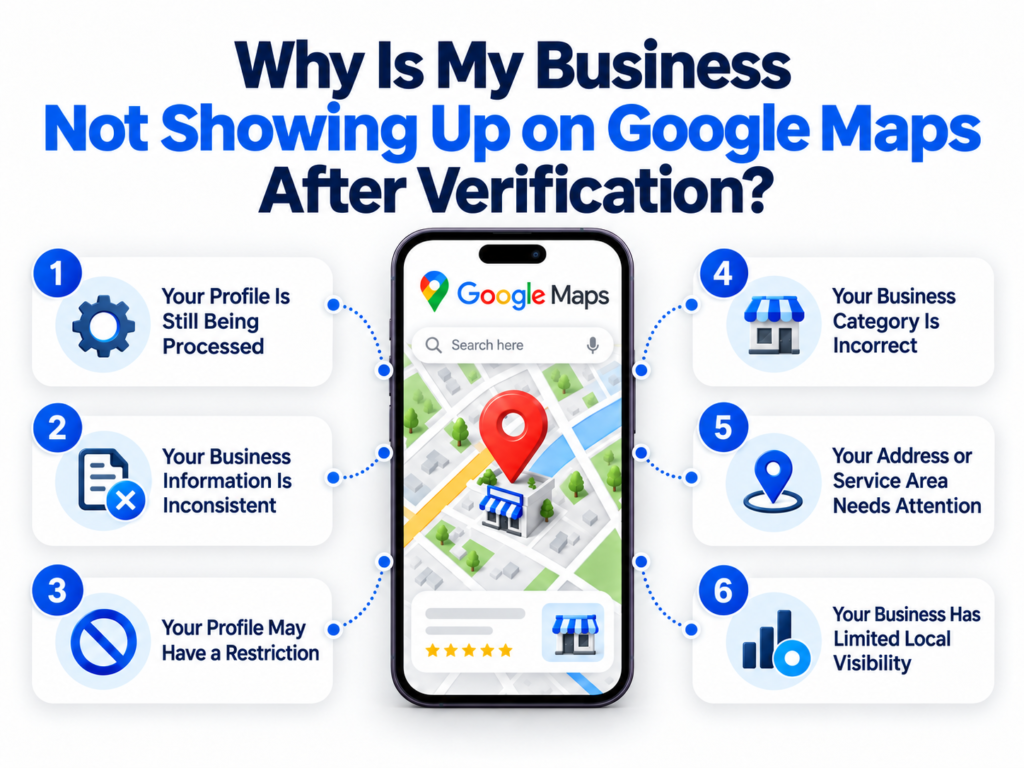
1. Your Profile Is Still Being Processed
If you’ve just finished verification, your profile may still be in Google’s processing or review processes. Your business might not show up consistently when you search for it during this time.
And then wait a few minutes for Google to evaluate the verified profile and see whether your listing appears accessible later.
2. Your Business Information Is Inconsistent
Google pulls business info from your profile, website, directories and other places online. If your business name, address, phone number or other facts don’t match, Google may have a tougher time accurately determining information about your firm.
Double check your key business information and ensure it’s consistent throughout your website, Google Business Profile and relevant online directories.
3. Your Profile May Have a Restriction
Google can restrict or suspend a profile when it detects a possible problem with the listing or compliance with Google’s criteria.
Check your Google Business Profile for any notices, cautions or requests for further information. If your profile is suspended or limited, go through the resolution or appeal process that Google has in place, not create a new profile.
4. Your Business Category Is Incorrect
Your primary category is an easy way to tell Google what your business is all about. Selecting an unrelated or too broad category could affect how relevant your profile is for local searches.
Choose a primary category that describes your core service or kind of business. Supplementary categories, if relevant, may be added as well.
5. Your Address or Service Area Needs Attention
The way you set up your business might also effect how your listing looks. firms having a physical site clients visit, and service-area firms have different criteria.
Make sure your address or service area settings truly reflect how your firm operates. Ensure that your profile information fits how you do business in the real world.
6. Your Business Has Limited Local Visibility
Verification for your business doesn’t imply you will be at the top of the Google Maps listings. Local results can also be affected by distance, prominence and relevance, for example.
So for example, your firm might surface when someone searches for the exact name of your business, but it might not rank high when someone searches for something generic like “digital marketing agency near me.
Improve your local SEO signals by working on your website content, customer reviews, business information, and overall local online presence.
How to Check Your Google Maps Listing
First, search your exact business name and location on Google Maps. Or you can try searching depending on the items or services you supply.
Then, go to your Google Business Profile and look for notifications or problems. Check your business name, category, address, phone number, website, business hours and service-area information.
If you can’t find the listing, don’t just create another profile. Duplicate listings might cause further issues and make it more difficult to maintain your business information.
How Can Local SEO Improve Your Visibility?
There’s more to Google Maps visibility than just confirming your business. There are several approaches to accomplish an efficient local SEO strategy, from keeping the appropriate information about your business and collecting honest evaluations from your consumers to creating interesting local content and upgrading your profile.
Your website must also clearly present the services you offer, your business location, your contact details, and the area in which you operate. When all places provide even greater consistency in the information they have about your business, search engines will see your business in the best light.
Final Thoughts
If your business is verified but not appearing in Google Maps then it might not be the verification itself. It could be something to do with business information, categories, limits, service areas or local exposure or your profile could still be processing.
Be sure to check your profile for accuracy, correct any incorrect information and have a regular local SEO strategy. Accurate business information and a strong web presence can help you provide Google with more information about your business and increase your chances of getting found in relevant local searches.





Author Bio
By Hardip Koradia
Hardip Koradia, with over 15 years in the IT sector, masterfully blends Web Design, Development, SEO, and Digital Marketing, propelling Loyal Web Solutions since 2011 as its visionary CEO. Under his guidance, the firm has witnessed consistent growth and cultivated a team of mindful professionals. Off-duty, Hardip delves into internet research, sharing invaluable insights about the digital world, from web intricacies to mobile app trends.